Mom Master of Multitasking
First Impressions: A Design That Speaks to Real Life
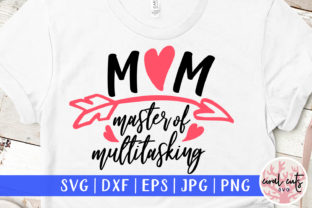
When I first opened the Mom Master of Multitasking design, I immediately thought of the kind of client who walks into a craft fair booth with a tote bag slung over one shoulder, a toddler in one arm, and a coffee in the other. This design isn’t trying to be overly cutesy or minimalist. It’s warm, confident, and subtly humorous — the kind of embroidery that feels like a high-five to moms who juggle a million things daily.
The layout is clean and balanced, with a central phrase that's easy to read even from a distance. The font style is modern without being trendy, and the spacing feels intentional — not too tight, not too loose. It gives off a relaxed but polished energy, which is exactly what many handmade product buyers are looking for these days.
Real-World Use: From Tote Bags to Sweatshirts
I decided to test this design on a few different materials to see how it would hold up in actual embroidery projects. I started with a cotton tote bag — a common go-to for Etsy sellers and small craft businesses. The satin and fill stitches translated well, and the lettering held its shape without distortion.
Next, I stitched it onto a fleece sweatshirt. The texture of the fabric made the design feel a bit softer, which worked in its favor. It gave the phrase a more casual, everyday vibe that would be perfect for a cozy gift or boutique-style apparel line.
I also tried a baby onesie, and while the design is a bit large for the front of a newborn size, it scaled down nicely for a 12-month garment. The key here is to make sure the stitch density doesn’t overwhelm the delicate fabric. A lightweight stabilizer helped maintain clarity without puckering.
Where It Shines — And Where to Be Careful
This design works best on flat, stable surfaces like tote bags, pillow covers, and tea towels. It also holds up well on mid-weight fabrics like denim and cotton canvas, making it a solid choice for embroidered patches or apron accents. I can see this being a popular option for Mother’s Day gifts, personalized baby items, or as part of a seasonal holiday collection.
However, I’d be cautious when applying Mom Master of Multitasking to curved surfaces like baseball caps or stretchy knits. The phrase is long enough that it can warp slightly if the fabric pulls during stitching. If you’re aiming for a professional finish, make sure your stabilizer is up to the task, and test the design on a similar fabric before committing to a final product.
Dark fabrics also require a bit more attention. The white thread I used for my sample stood out beautifully on a navy tote, but the satin stitch edges caught more light than I expected. For a subtler look, consider using a tone-on-tone thread or adding a small shadow layer if your embroidery software allows it.
Visual Appeal and Product Value
From a design standpoint, this embroidery file has strong visual appeal. It’s legible, balanced, and emotionally resonant — a winning combo for handmade products that need to stand out in a crowded market. Whether you're creating a personalized gift or a small batch of boutique-style apparel, this design adds a touch of personality without being overwhelming.
For Etsy sellers and small shop owners, that kind of versatility is gold. It’s the kind of design that customers can easily connect with, which in turn boosts buyer engagement and repeat sales. Plus, because the layout is clean and symmetrical, it looks great in digital mockups — a huge plus if you're marketing your products online or offering printable previews.
That said, don’t assume this design will work for every project. If you’re aiming for a minimalist aesthetic or selling to a more formal audience, this might feel too casual. But for the right niche — like mom-focused gifts, personalized home decor, or custom apparel — it adds real value to the finished product.
Designer Notes: What to Watch For
- Test on scrap fabric first. Especially if you’re using a new stabilizer or working with a tricky fabric like fleece or stretchy knit.
- Check thread color contrast. White looks crisp on dark fabrics, but may be too harsh for some designs. Try a soft gray or off-white for a more subtle effect.
- Review stitch density. Too dense can cause puckering, especially on thinner materials. Adjust as needed in your embroidery software.
- Confirm hoop size. This design is best suited for mid to large hoop sizes. If you’re limited to a small hoop, consider resizing or repositioning.
- Inspect small details. While the lettering is clear, very small text elements may close up on finer threads or lighter stitch settings.
- Test in black and white mockups. Helps you visualize how the design will look across different fabric colors and lighting conditions.
- Use proper stabilizer. Medium-weight tear-away works best for most cottons and woven fabrics. For stretchy materials, go with a light cutaway.
- Confirm licensing before selling. Since this is a digital embroidery file, always double-check whether it’s approved for commercial use or if you need to purchase a separate license.
Final Thoughts: A Solid Choice for Everyday Projects
As a designer and product reviewer, I appreciate when a design like Mom Master of Multitasking feels purpose-built for real-life use. It’s not just a pretty phrase — it’s something that connects with the people who will actually wear or use the finished product.
Whether you're creating a custom embroidered sweatshirt for a client, a personalized tote for a gift shop, or a digital embroidery file for your Etsy store, this design offers flexibility, clarity, and emotional appeal. Just keep an eye on your fabric choices, stabilizer setup, and color contrast to ensure the best possible outcome.
At the end of the day, that’s what good embroidery design is all about — not just looking nice on screen, but translating beautifully into the real world, one stitch at a time.